
Pixel Size (Legacy Transformation Widget)#
Converts the detector frame coordinates from pixels to physical units.
Signals#
Inputs: Dataset
Outputs: Dataset
Description#
Provides frame coordinates in micron in other analysis widgets.
To compute pixel size at the sample position, darfix needs the optical pixel size parameter. This is the effective pixel size as seen by the detector optics at the detection plane.
Predefined values based on the current setup at ID03 are defined as 2× magnification or 10× magnification. The user can also select Manual Magnification to override this value. The optical pixel size depends on the optical setup of your experiment.
For the aspect ratio, the user can also choose to divide pixel size by \(\sin(2\theta)\) for the vertical (or horizontal) direction to account for the projection of the beam onto the detector plane.
When input parameters are updated, the widget recomputes automatically the pixel size at sample position in horizontal and vertical direction.
This output is then used to compute the scale of axes in other analysis widgets later in the workflow.
Note
Transformation is a prerequisite for Chi Gradient Correction, which requires the pixel size in microns.
How the pixel size at sample position is computed#
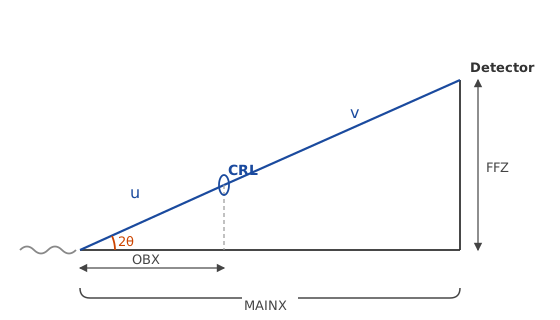
The DFXM setup uses a compound refractive lens (CRL) to image the diffracted beam onto the detector. The geometry is shown below:
The magnification is:
where:
\(OBX\) is the sample-to-lens distance
\(MAINX\) is the sample-to-detector distance
\(u = OBX / \cos(2\theta)\) is the object distance along the beam
\(v = MAINX / \cos(2\theta) - u\) is the image distance
The physical pixel size at the sample plane is then:
where \(d_{px}\) is the optical pixel size.